
Add Contacts to Your Network
There are 2 ways to add contacts / voters to your REACH network
Single Load
-
-
- Add contacts 1 by 1 through the Search Function.
- This is a great way to add contacts slowly as you build your network of family friends and neighbors.
- This is also how you Expand your network.
-
Import
-
-
- Import is a great way to quickly load your Pinellas County Voters that are already in your phone contact list.
- Learn more about IMPORT.
-
Single Load
Start with SEARCH
Go to the REACH Home Page.
Find the magnifying glass icon at the bottom of the screen.
Note: The voter files for all active voters in Pinellas County are loaded in the Voter Action Pinellas site on Reach and updated on a planned schedule.
Type in the name of a voter you'd like to add to your voter network.
Depending on how common the name is, you may also wish to include the voter’s city.

Trouble Finding a Voter?
If your search doesn't generate any results, you'll get a screen like this.
You could be having trouble because the name your voter uses for registration doesn't match the name you entered. You could try to search another way.

Got a Match?
If there is at least one match in the voter file, you'll land on a list of Pinellas voters who meet your criteria.
Select your voter.

Voter Home Page
Once you’ve selected a voter, you ‘ll land on the Voter Home Page.

FIRST check to see if someone else has contacted them.
You'll see that this voter has been contacted by another volunteer.
If someone else has contacted the voter, that may mean that they’re already connected and well covered for voting information.
You may want to ask your voter if they’re already covered by someone else.

Add Voter
If you want to add the voter to your network, click the “Add to My Network” icon.
This isn’t like Facebook or other social media; a voter doesn’t have to accept a friend request from you to be added.
This is just a way for you to keep track of people in your personal network whom you’re helping vote.

Relationship
When you click the "Add to My Network" button, you’ll land on a screen that prompts you you to select your relationship with the voter. Select the appropriate option.
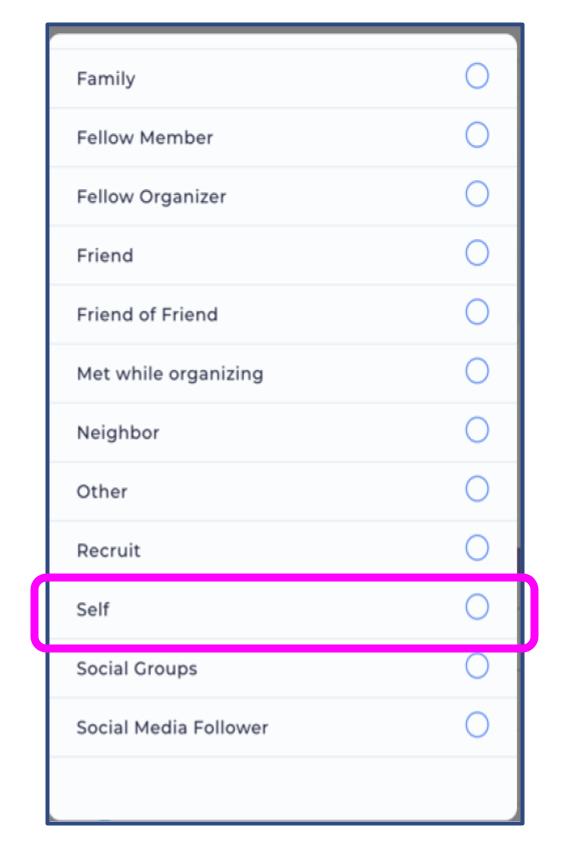
You’ll know that you’ve added the voter to your network because an icon showing your relationship will appear on the screen.

Empowering voters in our community
Paid for by Voter Action Pinellas and Voter Action Network.
Contributions (CLICK HERE) to Voter Action Pinellas and Voter Action Network are not deductible for federal income tax purposes.